

PM Youth Loan Apply Online — Step-by-Step 2026
You can apply for the PM Youth Business and Agriculture Loan Scheme online at pmybals.pmyp.gov.pk — the official portal operated by the Prime Minister’s Youth Programme (PMYP). The application takes 20 to 30 minutes to complete on a mobile phone and requires your CNIC, NTN, a scanned copy of your business feasibility study, and a mobile number registered on your own CNIC. After online submission, a partner bank in your district contacts you within 7 to 15 working days to schedule your branch visit — the branch visit is the second and final stage of the application.
What Is This Guide?
This guide covers only the online application stage at pmybals.pmyp.gov.pk — every screen, every field, every document upload, and every error message explained step by step. For the complete scheme overview including loan tiers, eligibility, and what happens after the bank visit, read our PMYB&ALS / Kamyab Jawan Complete Guide.
Before you start your online application, confirm two things. First, check your eligibility — your age, CNIC status, and credit record — using our PM Youth Loan Eligibility guide. Second, have your feasibility study ready before opening the portal — you cannot save a half-completed application and return later.
What You Need Before You Open the Portal
Gather everything below before going to pmybals.pmyp.gov.pk. Opening the portal without these ready wastes your session and forces you to restart:
- CNIC — 13-digit number ready to type. Original CNIC in hand for reference.
- Mobile number — the SIM registered on your own CNIC. This number receives your OTP. A different SIM will not receive the correct OTP.
- NTN number — your National Tax Number from FBR. If you do not have an NTN, register free at fbr.gov.pk before applying.
- Business feasibility study — saved as a PDF or image file under 2MB on your phone or device. This is the most common missing document. Read our SMEDA Business Plan guide if you do not have one yet.
- CNIC scan — a clear photograph of the front and back of your CNIC, each under 2MB.
- Your photograph — a recent clear photograph of your face, under 2MB.
- Stable internet connection — the portal times out on very slow connections. Use WiFi if available, or mobile data on 4G.
How to Apply at pmybals.pmyp.gov.pk — Complete Steps
Step 1 — Open the Official Portal
- Open your browser — Chrome or any browser works on Android and iPhone.
- Type pmybals.pmyp.gov.pk in the address bar exactly as written.
- Check the URL carefully — confirm it shows pmybals.pmyp.gov.pk and not any variation or lookalike address.
- The homepage loads with a green and white government design. You will see an “Apply Now” button in the centre of the page.
If the page does not load, your internet connection may be slow or the portal may be under maintenance. Wait 5 minutes and try again. Do not proceed on any other website claiming to be the PM Youth Loan portal.
Step 2 — Start Your Application
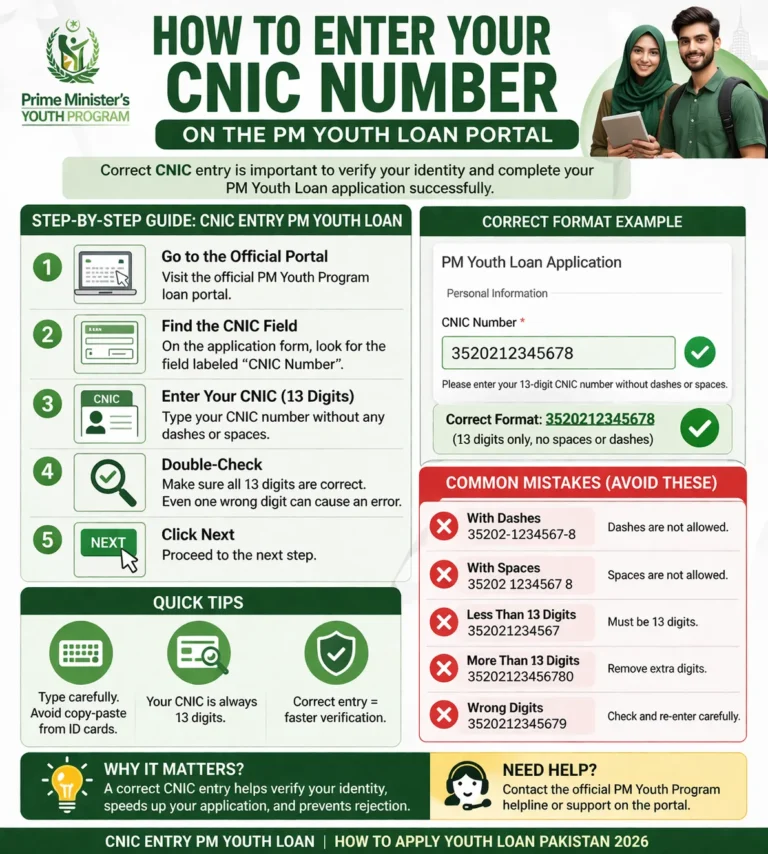
- Click or tap “Apply Now” on the homepage.
- A new page opens asking for your CNIC number.
- Enter your 13-digit CNIC number — type it without any dashes or spaces. Example: 3520112345678.
- Click “Next” or “Proceed.”
- The system checks your CNIC against NADRA records instantly. If your CNIC is not registered with NADRA or has an issue, an error message appears — read the error carefully and note it down.
Step 3 — Mobile Verification
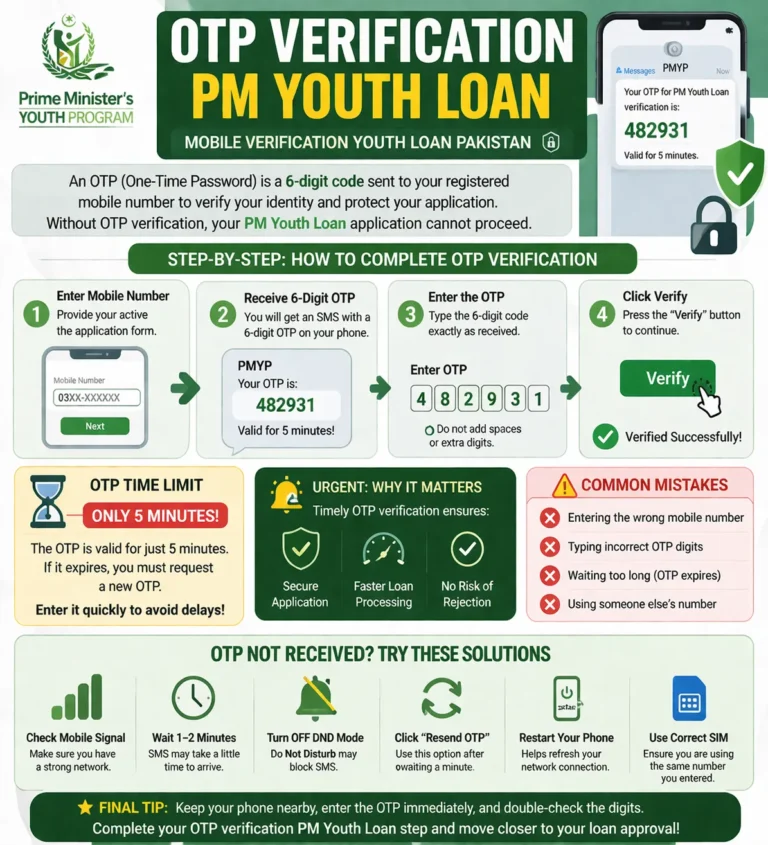
- A field appears asking for your mobile number.
- Enter the mobile number that is registered on your own CNIC — not a family member’s number, not a second SIM.
- Click “Send OTP.”
- An OTP code arrives by SMS within 2 minutes on Jazz, Zong, Telenor, or Ufone.
- Enter the 6-digit OTP code in the field on screen.
- Click “Verify.”
- You have 3 minutes to enter the OTP before it expires. If it expires, click “Resend OTP” — do not refresh the page.
If the OTP does not arrive after 5 minutes, close the browser, wait 10 minutes, and restart from Step 1. Using a SIM not registered on your CNIC is the most common reason OTPs fail to arrive correctly.
Step 4 — Personal Details
- A form opens with several fields. Fill each one carefully:
- Full Name — type your name exactly as it appears on your CNIC. No nicknames.
- Father’s Name — exactly as on your CNIC.
- Date of Birth — enter in the format shown on screen (DD/MM/YYYY).
- Gender — select Male or Female.
- Province — select your province from the dropdown.
- District — select your district. This determines which partner bank receives your application.
- Tehsil — select your tehsil from the list.
- Permanent Address — type your address as registered on your CNIC.
- Current Address — if different from CNIC address, enter your current address here.
Every field in this section must match your CNIC exactly. Mismatches between your form and CNIC records are a common cause of delays at the bank stage.
Step 5 — Business Details
- Business Category — select from the dropdown: Manufacturing, Services, Trade, Agriculture, or IT and E-Commerce. Choose the category that best describes your planned or existing business.
- Business Name — enter your business name or your planned business name.
- Business Address — enter the full address where your business operates or will operate. This must be within your selected district.
- Business Status — select New Business or Existing Business.
- Years in Operation — if existing business, enter how many years it has been running. Enter 0 for a new business.
- Number of Employees — enter the current number of employees. Enter 0 if starting new.
- Annual Business Turnover — enter your approximate annual revenue. Enter 0 for new businesses.
Step 6 — Select Your Loan Tier
- Loan Tier — select T1, T2, or T3 from the dropdown.
- T1 — select if you need Rs. 100,000 to Rs. 500,000. Interest-free. No collateral required.
- T2 — select if you need Rs. 500,001 to Rs. 1.5 million. 5% annual markup.
- T3 — select if you need Rs. 1.5 million to Rs. 7.5 million. 7% annual markup.
- Loan Amount Requested — enter the exact amount you need within your selected tier. Do not request more than your business plan supports — banks cross-check your feasibility study against this number.
- Loan Purpose — write a brief description of how you will use the loan. Example: “Purchase raw materials and equipment for garment manufacturing unit.”
For a full breakdown of which tier suits your business and how monthly repayments are calculated, read our PM Youth Loan Tiers guide.
Step 7 — Upload Documents
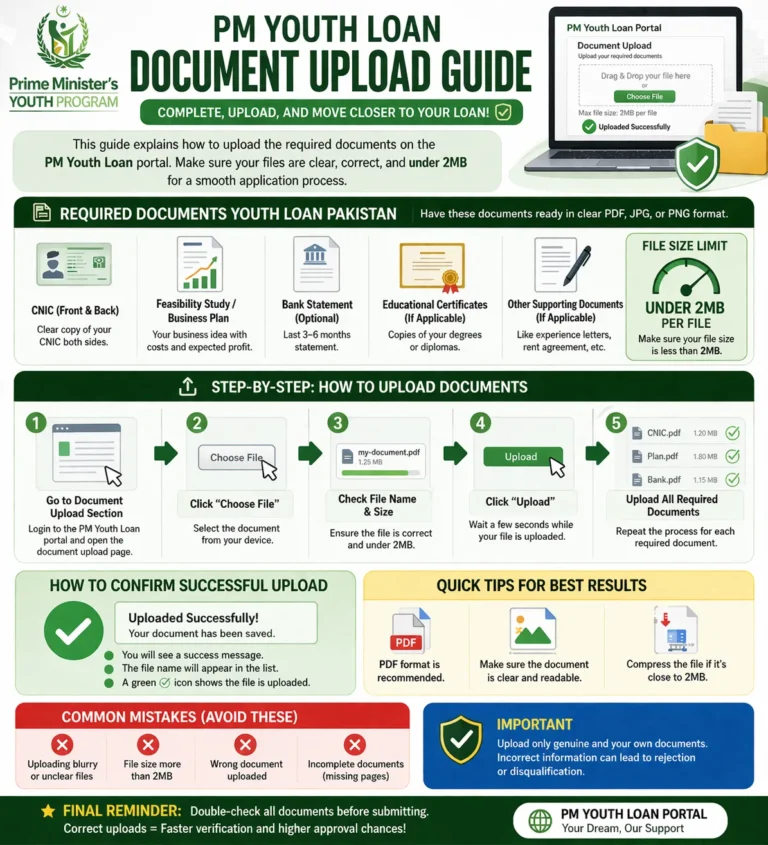
- CNIC Front — tap the upload button and select the photograph of the front of your CNIC. File must be JPG, PNG, or PDF. Maximum 2MB.
- CNIC Back — upload the photograph of the back of your CNIC. Same format, same size limit.
- Applicant Photograph — upload a recent clear photograph of your face. Plain background preferred. Maximum 2MB.
- Business Feasibility Study — upload your feasibility study as a PDF. This is the most important document. If your file is larger than 2MB, compress it using any free PDF compressor before uploading.
- NTN Certificate — upload your FBR NTN certificate or FBR registration confirmation. Download it from fbr.gov.pk if you do not have a saved copy.
- Business Address Proof — upload a utility bill, rental agreement, or property ownership document showing your business address. Must be dated within the last 3 months.
Each document shows a green tick after successful upload. A red cross means the file was not accepted — check the format and size and try again.
Step 8 — Review and Submit
- A summary page shows all your entered details and uploaded documents.
- Read every field carefully. Check your CNIC number, mobile number, district, loan tier, and loan amount one more time.
- Tick the declaration checkbox confirming your information is accurate and complete.
- Click “Submit Application.”
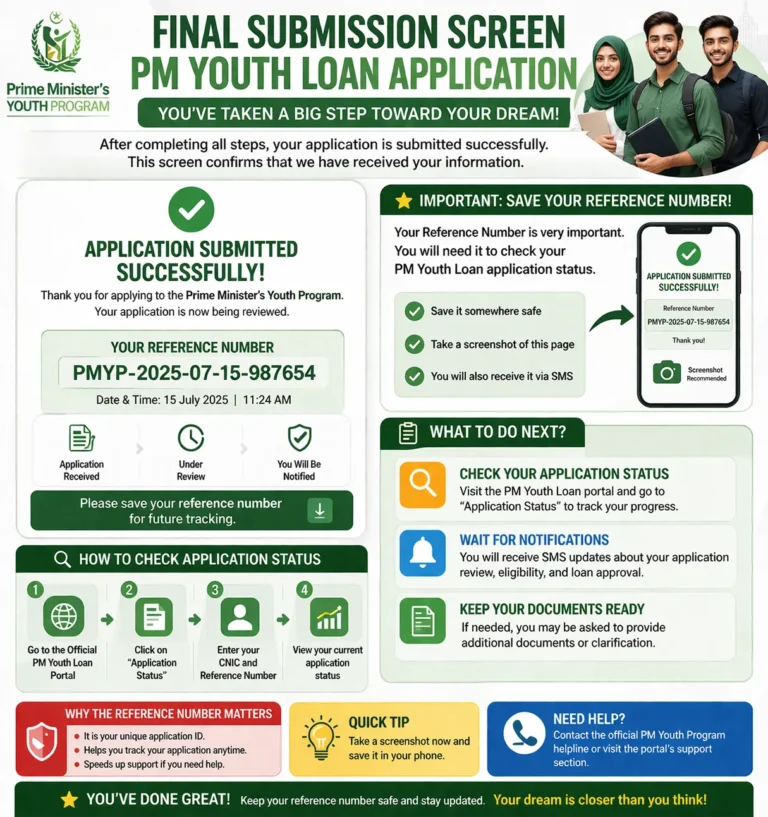
- A confirmation screen appears with your Application Reference Number — a unique code assigned to your submission.
- Screenshot or write down this reference number immediately. You need it to track your status and to call the helpline.
- An SMS confirmation arrives on your registered mobile number within a few minutes confirming successful submission.
What Happens Immediately After You Submit
After successful submission, your application enters the PMYP system for initial review. This is what happens next:
- Day 1 to 3 — PMYP system verifies your CNIC against NADRA and SBP credit records automatically
- Day 3 to 7 — If basic eligibility is confirmed, your application is forwarded to a partner bank in your district
- Day 7 to 15 — The bank contacts you by SMS or phone call to schedule your branch visit
- Branch visit — You attend the bank with original documents for the final assessment stage
The online application alone does not approve your loan. The bank branch visit is mandatory and is where the final credit and business plan assessment happens.
To track your application after submission, read our PM Youth Loan Status Check guide.
Solving Problems — What To Do When the Portal Does Not Work
Page Not Loading
Confirm you are on pmybals.pmyp.gov.pk exactly. Clear your browser cache — in Chrome on Android, tap the three dots, go to Settings, then Privacy, then Clear Browsing Data. Try again on a different browser. If the portal is down for maintenance, an announcement appears on the PMYP homepage at pmyp.gov.pk.
OTP Not Arriving
Use only the SIM registered on your own CNIC. Check that your phone has mobile signal — no signal means no SMS delivery. If the OTP does not arrive in 5 minutes, close the browser completely, wait 10 minutes, and restart. Do not attempt more than 3 OTP requests in one hour — the system temporarily blocks your number after excessive requests.
CNIC Not Recognised by Portal
Your CNIC may not be active in NADRA’s system or may have an expiry issue. Visit your nearest NADRA office with your original CNIC to verify its status. A CNIC that has expired or has a data mismatch in NADRA’s database will not pass the portal’s verification check.
Document Upload Failing
The most common causes are file size above 2MB or an unsupported file format. Compress your PDF using ilovepdf.com or any free tool. Convert images to JPG format if PNG files are rejected. Ensure your internet connection is stable — upload failures often happen on weak 3G connections. Switch to WiFi or 4G before retrying uploads.
Application Submitted But No Reference Number Appeared
Check your registered mobile number for an SMS confirmation — the reference number is also sent by SMS. If no SMS arrived and no reference number appeared on screen, your application may not have submitted successfully. Log in to pmybals.pmyp.gov.pk with your CNIC and check whether a draft or submitted application exists under your account. If nothing is found, restart the application from Step 1. Call the Kamyab Jawan helpline at 0800-26477 if the issue persists — free from any network.
Portal Shows “Already Applied” Error
This means an application is already linked to your CNIC. Log in to pmybals.pmyp.gov.pk to check the status of that existing application. If you did not submit it yourself, call 0800-26477 immediately to report the issue.
⚠ Fraud Warning
The only official application portal is pmybals.pmyp.gov.pk. The only official helpline is 0800-26477. No agent, WhatsApp group, Facebook page, or third-party website can submit your application or assist with OTP issues. The application is completely free. Do not pay anyone any fee at any step of this process.
Go to pmybals.pmyp.gov.pk now with your CNIC, NTN, feasibility study, and CNIC scans ready. Complete all eight steps in one sitting — the portal does not save drafts. After submission, save your reference number and wait for the bank’s SMS within 7 to 15 working days. If you have not received a bank contact after 15 working days, call 0800-26477 with your reference number.
Frequently Asked Questions
Where do I apply for the PM Youth Loan online?
The official portal is pmybals.pmyp.gov.pk — operated by the Prime Minister’s Youth Programme. This is the only website where PMYB&ALS applications are submitted. No other website or app processes official Kamyab Jawan applications. The application is free and available 24 hours a day.
What documents do I need to upload on pmybals.pmyp.gov.pk?
You need to upload your CNIC front and back, a recent photograph, your NTN certificate, your business feasibility study, and proof of business address. Every file must be under 2MB in JPG, PNG, or PDF format. The feasibility study is the most frequently missing document — read our SMEDA Business Plan guide if you need help getting one prepared.
Can I save my application and complete it later?
No. The pmybals.pmyp.gov.pk portal does not save draft applications. You must complete all steps in one sitting. Gather all documents and your CNIC and NTN details before opening the portal so you can finish without interruption.
What is the reference number and why do I need it?
Your reference number is a unique code assigned to your application after successful submission. You need it to track your application status at pmybals.pmyp.gov.pk, to check which bank has received your application, and to quote when calling the helpline at 0800-26477. Screenshot it the moment it appears on screen. It is also sent to your registered mobile number by SMS.
What happens after I submit my online application?
Your application is verified by the PMYP system within 1 to 3 days and then forwarded to a partner bank in your district. The bank contacts you within 7 to 15 working days to schedule a branch visit. The branch visit is mandatory — the loan is not approved on the basis of the online application alone. Track your status using our PM Youth Loan Status Check guide.
My application was submitted but I got no bank call after 15 days — what do I do?
Log in to pmybals.pmyp.gov.pk with your CNIC and reference number to check your current status. If the status shows “forwarded to bank” but no contact has been made, call the Kamyab Jawan helpline at 0800-26477 — free from Jazz, Zong, Telenor, and Ufone. Have your CNIC and reference number ready. If your application was rejected at the initial PMYP check, read our PM Youth Loan Rejected guide for next steps.